 MicroURL
All guides
Branded QR codes
Give a link's QR code your colors, your logo and a short call to action, at a size that prints sharply.
1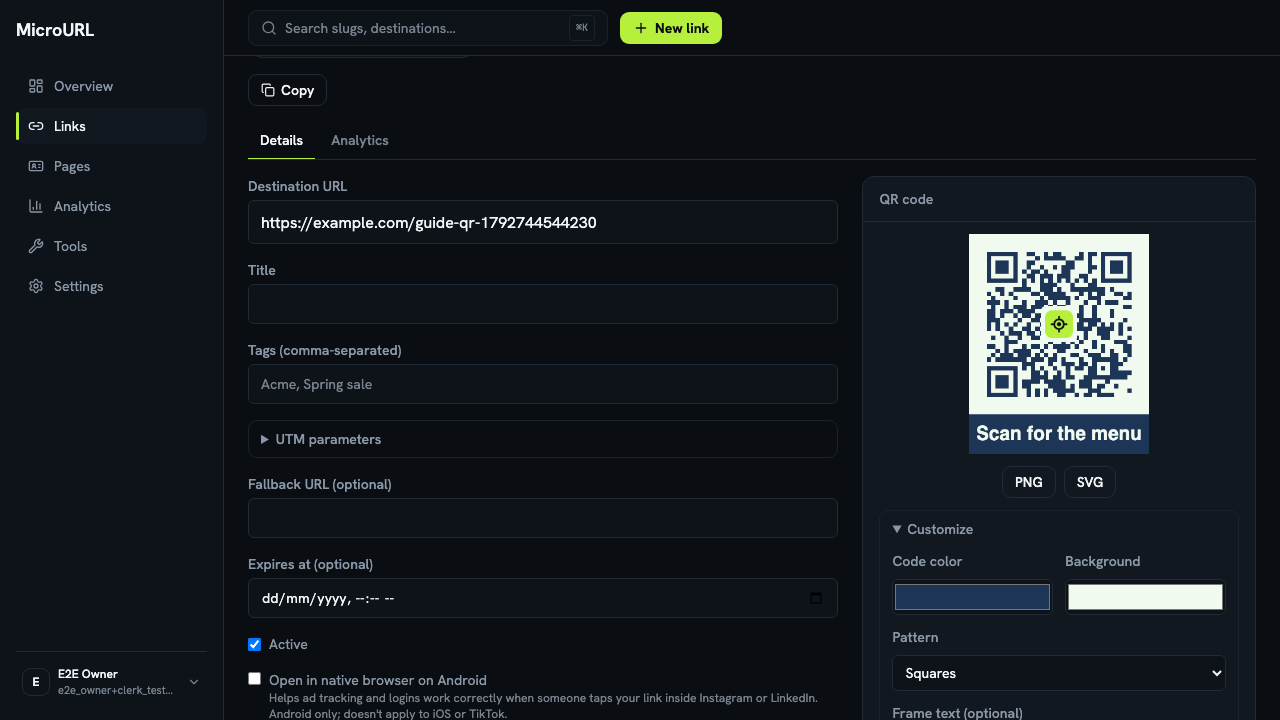
Open the QR code on a link
Open any link. Its QR code is on the right (below the form on a phone). Click Customize.
2
Choose colors, a logo and frame text
Set Code color and Background, upload a Logo (PNG, JPEG or SVG), and add Frame text such as “Scan for the menu”. If the colors are too close for phones to scan reliably, you’ll see a warning and downloads are paused until it’s fixed.
3
Download for print or screen
Pick Size: the print size is 1024 px. Download PNG or SVG. The code points at your short link, so you can change where it goes later without reprinting anything.
4
Need codes for many links?
On the Links page, tick the links you want and choose QR codes. Pick one style for all of them, then Download ZIP to get an SVG and a PNG for each link.